
Make a Decision
DECISION ASSISTANT
Make clearer, values/goals-based decisions with structured scoring, visual breakdowns, and practical reflections.
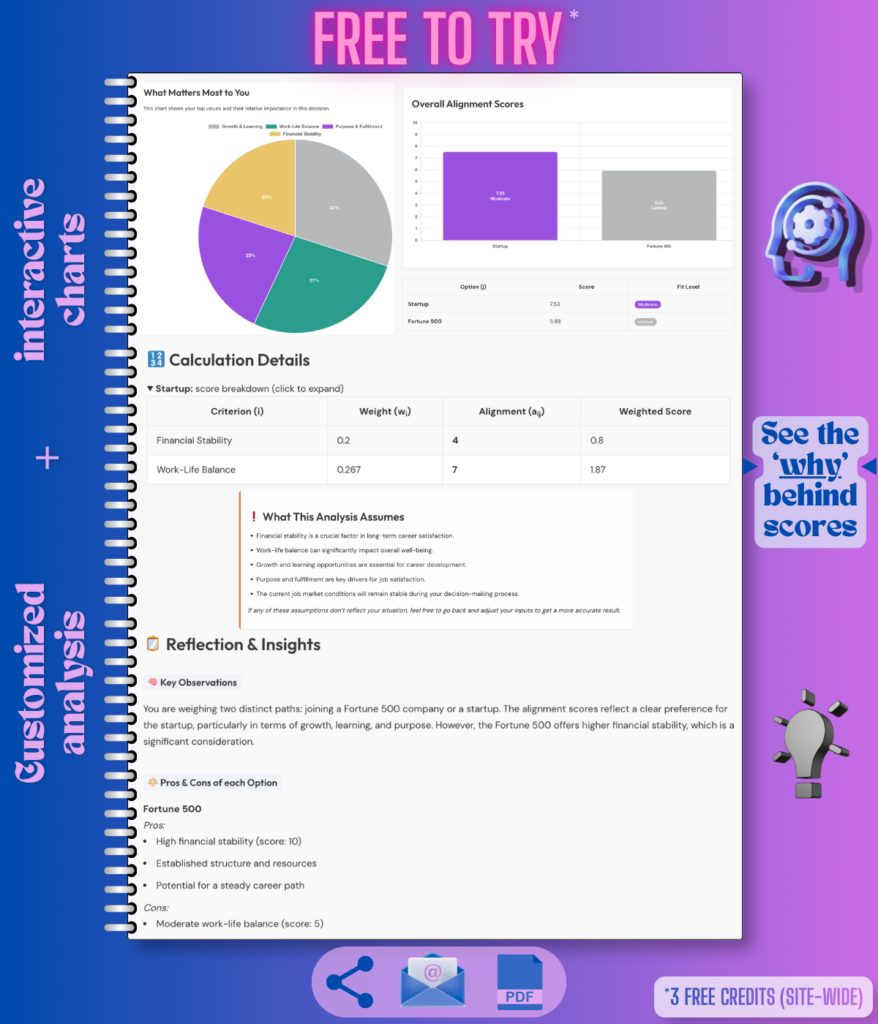
Compare your options against what matters most to you. Decision Assistant uses your priorities, constraints, concerns, and known facts to generate alignment scores, charts, pros and cons, assumptions, and a clear reflection you can review, save, or share.
How This Tool Improves Reliability
Example Analysis Reports (PDFs)
See what the output looks like before you generate your own.
Examples are for demonstration. Actual results vary based on your inputs.
Move Cities or Stay Put?
A classic life decision involving career, lifestyle, relationships, and personal growth.

Options (5)
Priorities (6)
Constraints
Concerns / Risks
See how the Decision Assistant analyzes your priorities, options, constraints, and risks to help you decide with clarity.
Hire vs. Outsource for Faster Delivery
A strategic business decision about growth, focus, and resource allocation.

Options (5)
Priorities (4)
Constraints
Concerns / Risks
See how the Decision Assistant analyzes your priorities, options, constraints, and risks to help you decide with clarity.
Choose Between Two Job Offers
A decision weighing financial security, work-life balance, growth, and risk of burnout.

Options (5)
Constraints
Concerns / Risks
See how the Decision Assistant analyzes your priorities, options, constraints, and risks to help you decide with clarity.
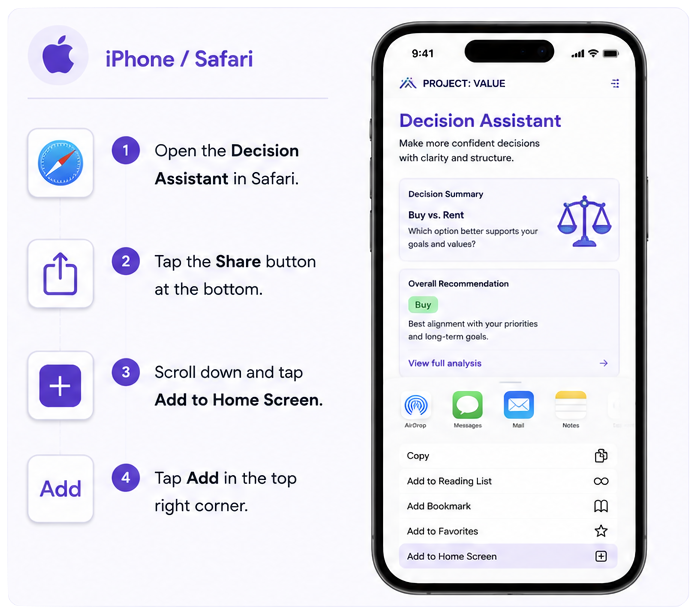
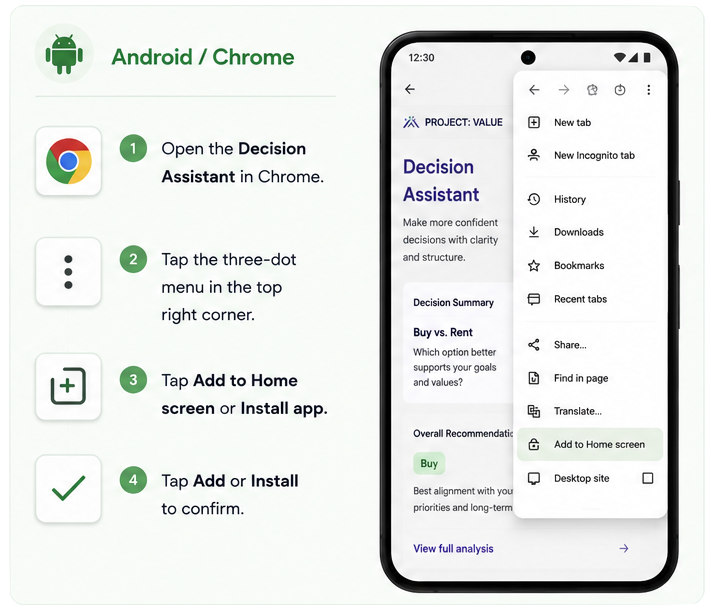
📲 Add Project: VALUE Tools to Your Phone
Use Project: VALUE tools like an app – no app store download needed. Add this page to your home screen for one-tap access whenever you’re ready to make the next decision.
Decision Assistant FAQ — Helpful Tips Before You Submit
You can use it for personal or business decisions—like career choices, strategy planning, moving cities, or selecting vendors.
You can enter up to 5 different options. The tool will score and analyze them side-by-side.
No worries—you can select from common values / goals, or add your own. The tool will guide you through the rest.
Yes! You’ll be able to assign a weight (1–10) to each value or goal based on what matters most.
Yes. Decision Assistant uses AI to compare options, estimate alignment with your values/goals, and highlight trade-offs. It can still be incomplete or based on assumptions, especially if key facts are missing or uncertain.
The tool does not independently verify external facts such as prices, deadlines, policies, ratings, reviews, availability, or legal/financial details. Use the results as a decision-support aid, not as a guaranteed answer.
Yes. After your analysis is generated, you can use the Refine This Analysis button on the results page to reopen the form with your previous inputs. You can adjust your options, known facts, values, weights, constraints, or concerns, then generate a new version.
Regenerating creates a new analysis and uses another credit. Your original results link remains available while it is still active.
Decision Assistant is designed to help you think through a decision clearly. It analyzes the information you provide — including your options, priorities, known facts, constraints, and concerns — and generates structured scores, trade-offs, assumptions, and practical reflections and insights.
It does not independently search the web or confirm live details such as pricing, availability, ratings, policies, reviews, or deadlines. For decisions that depend on current external facts, please verify those details separately before making a final choice.
Yes! Once your results are generated, you can download them as a PDF, share or send them to your email.
Yes. You can save Project: VALUE’s tools to your phone’s home screen. On iPhone, open this page in Safari, tap Share, then Add to Home Screen. On Android, open this page in Chrome, tap the three-dot menu, then Add to Home Screen or Install App.
Try describing your decision in simple terms. If you’re stuck, check out example scenarios on the tool page for inspiration.